No link light anywhere
The device and switch do not detect a physical Ethernet link.
Compare the device, adapter, two patch cords, switch port, and wall run one piece at a time before changing network settings.

Wi‑Fi & Networking
The wall cable is only part of an Ethernet connection. A computer adapter, short patch lead, wall termination, patch panel, or switch port can cause the same failure. Check the accessible ends first. A connection that works slowly or drops under PoE load also needs testing; a lit port does not rule out cable trouble.
Guide updated
Check the symptoms before changing the setup.
A controlled test separates the endpoint, patch leads, wall run, and switch before permanent work is quoted.
Four-part path
Work from the device toward the switch. Change one test cable or device at a time so you can tell which comparison made a difference.
A link light is useful evidence, not cable certification. A cable can link and still negotiate slowly, flap, accumulate errors, or fail under PoE load.
Does the same computer, adapter, camera, or access point link through a known-good connection?
Do the short removable cables at the room and network end pass a controlled comparison?
Does the permanent cable map to the expected jack and patch-panel position without an open, short, or split pair?
Is the correct port enabled, linked at the expected speed, powered correctly, and assigned to the intended network?
Check by symptom
The device and switch do not detect a physical Ethernet link.
Compare the device, adapter, two patch cords, switch port, and wall run one piece at a time before changing network settings.
A physical link exists, but the device has no usable local or internet connection.
Keep the physical evidence. Then review the authorized port profile, VLAN, DHCP, gateway, adapter, and upstream network path.
The link works, but negotiates below the capability of the device and switch.
Confirm both endpoints support the target speed, then inspect patch cords, terminations, pair continuity, and port errors.
A camera, phone, or access point has no power or repeatedly restarts.
Verify the exact device standard, switch or injector capability, power budget, cable path, and approved port. Never guess with passive power.
The same device and switch port work when the in-wall path is bypassed.
Focus on the two patch cords, jack, permanent cable, patch-panel termination, labeling, and any hidden coupler in that run.
The link flaps, errors increase, or performance changes with movement or traffic.
Stop flexing the cable. Preserve the symptom and inspect strain, damaged latches, terminations, cable route, link speed, and error counters.
Device-to-switch checks
These are evidence steps, not permission to modify a production network. The owner approves the device, port, outage window, and any permanent change.
Network wiring service detailsRecord the room, wall plate, device, adapter, patch cords, patch-panel label, switch and port, link speed, and the last approved change. Do not publish IP addresses, MAC addresses, serial numbers, network diagrams, or tenant details.
Use the same authorized device on an existing known-good connection, or use a known-good authorized device on the suspect connection. This separates one adapter from the shared cable path.
Compare one known-good patch cord and one known-good enabled switch port at a time. Do not move uplinks, phones, cameras, access control, payment systems, or other production cables just to create a test port.
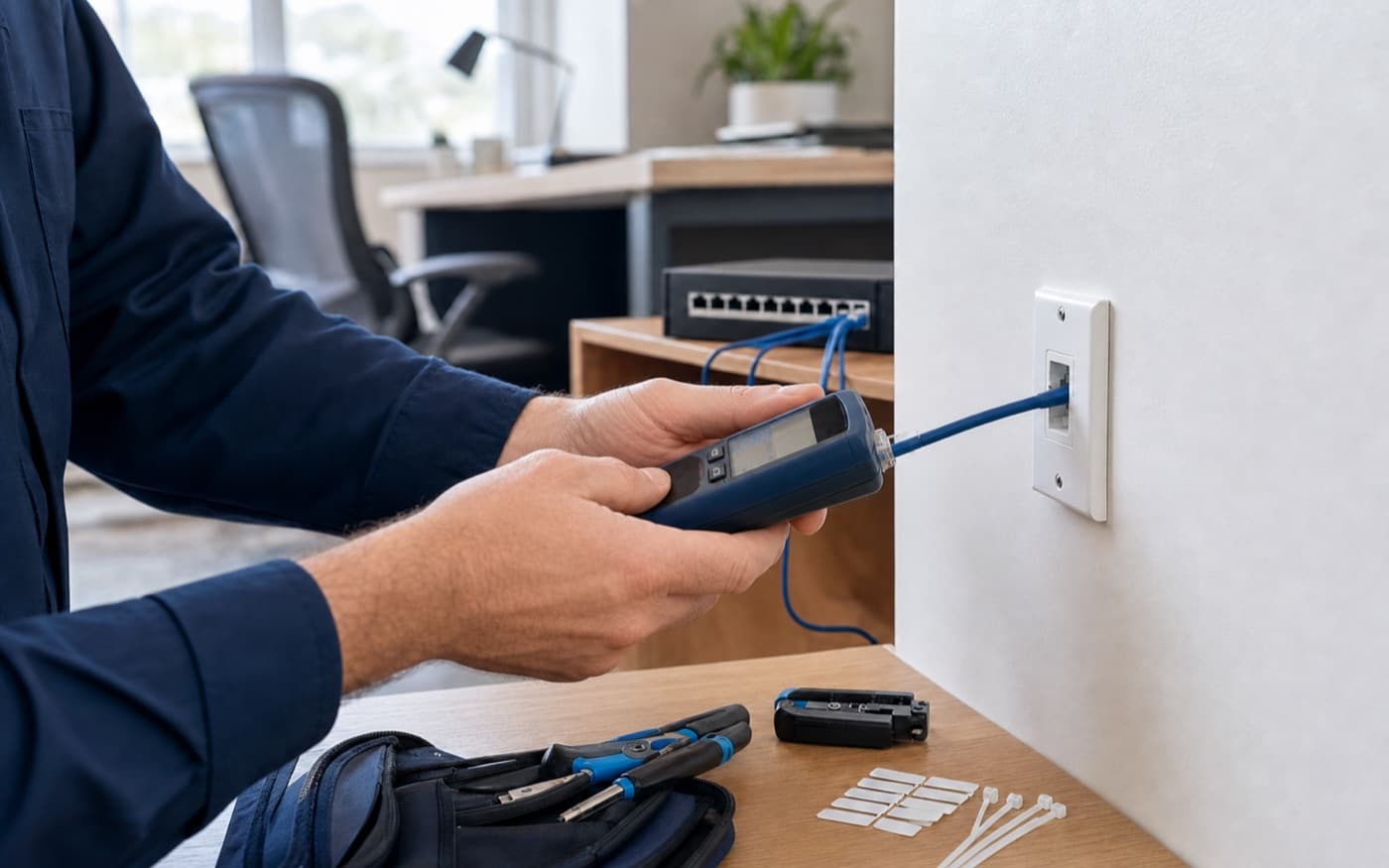
Match the wall plate to its patch-panel position and switch port using labels, a safe low-voltage toner, or a cable tester appropriate for the disconnected run. Never attach a toner or basic wiremap tester to live electrical wiring or an unknown powered circuit.
A basic continuity result can find opens, shorts, reversals, and some split pairs. It does not certify Cat5e/Cat6 performance, PoE delivery, installed-link quality, or reliable application traffic.
Re-terminating a jack, moving a switch port, changing a VLAN, enabling PoE, drilling, opening a wall, or replacing cable is separate approved work with a rollback and dependent-system check.
Read the result
| Evidence | Likely layer | Follow-up check |
|---|---|---|
| No link with one device, but a second authorized device links on the same cord and jack | Device, dock, USB adapter, driver, or local configuration | Keep the wall run unchanged and troubleshoot the endpoint or manufacturer-supported adapter path. |
| Both devices link through a direct known-good cord, but neither links through the wall path | Patch cord, jack, permanent cable, patch-panel termination, or wrong label | Trace and test the full run before re-terminating or replacing anything. |
| Physical link is stable, but the device receives no expected network service | Port profile, VLAN, DHCP, gateway, authentication, or upstream network | Escalate to the authorized network owner with the exact port and time; do not reset the switch. |
| Link negotiates low, flaps, or shows errors with known-good endpoints | Marginal patch lead, damaged pair, termination, excess path, interference, or port | Capture speed/errors and use appropriate cable qualification or certification before promising a cable grade. |
Facts checked July 15, 2026. Model-specific LED meanings, PoE modes, port controls, and supported diagnostics vary; follow the current manufacturer documentation for the exact equipment.
How Tech Genie helps
We can investigate the symptoms, explain the findings, and carry out the work you approve. Unresolved issues and provider referrals are included in the service notes.
FAQ
Wi‑Fi and the wired jack use different local paths. Working Wi‑Fi can prove the router and internet service are alive while the Ethernet device, adapter, patch cord, wall run, patch panel, or switch port still has a separate fault.
No. It proves the endpoints detected some physical link. A marginal cable can still negotiate below the expected speed, flap, accumulate errors, or fail under Power over Ethernet load. Record speed and stability, then test the path appropriately.
A basic wiremap tester can identify useful continuity faults such as opens, shorts, reversals, and some split pairs. It does not certify installed Cat6 channel or permanent-link performance. Certification requires appropriate calibrated equipment, test limits, adapters, and a saved result.
Not as a first step. A reset can interrupt every user and erase network, VLAN, PoE, camera, phone, or business settings without repairing a damaged patch cord or termination. Isolate the single path first and change configuration only with authorization and rollback.
Tech Genie can inspect, trace, test, plan, and quote ordinary network-wiring work within the approved site scope. Access, wall type, attic or crawlspace conditions, conduit, fire stopping, permits, landlord rules, electrical proximity, and trade requirements determine whether Tech Genie can perform the run or should coordinate the proper cabling or building professional.
Keep troubleshooting
Wi‑Fi bars do not prove internet access. Find out whether the outage affects one app, one device, wireless devices, or the whole site.
Read guide 8 min
An offline UniFi device may still serve clients. Check its controller connection, power, and network path before resetting it.
Read guide 9 min
Compare the weak room with the router location, then check walls, interference, and the connection between mesh nodes.
Read guide 7 min
Tech Genie is not a licensed contractor. Construction-related work is limited to casual, minor, or inconsequential projects totaling less than $1,000 for labor, materials, and all other items, requiring no building permit, and performed without employees or paid helpers.